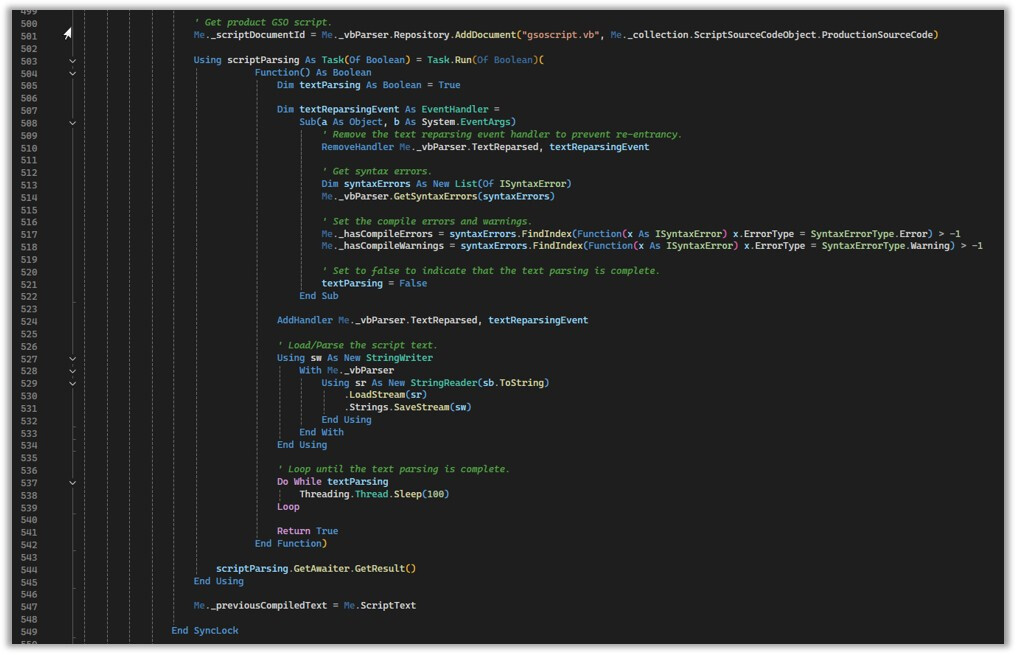
I need to load text into the VBParser synchronously. Below is the code I am using but is loading in background thread and code after is continuing.
Using sw As New StringWriter
With Me._vbParser
Using sr As New StringReader(sb.ToString)
.LoadStream(sr)
.Strings.SaveStream(sw)
End Using
End With
End Using
I need it to wait here until text has been parsed, so errors get populated. Otherwise, my sub returns and Me.HasCompileErrors will be false when there are errors.
Me._vbParser.GetSyntaxErrors(errors)
Me.HasCompileErrors = errors.FindIndex(Function(x As ISyntaxError) x.ErrorType = SyntaxErrorType.Error) > -1
Me.HasCompileWarnings = errors.FindIndex(Function(x As ISyntaxError) x.ErrorType = SyntaxErrorType.Warning) > -1
first question: what is your environment? Do you use WinForms or WPF?
You might try this - hope that it also populates the errors collection:
Me._vbParser.ForceReparseText()
But I am not sure whether this helps. And we have observed that it might simply deadlock in WinForms environment - this is the reason for my initial question.
You might also try to register a notifier - hopefully it is called after text parsing is completed, and in “MyNotifier.Notification” you could check for errors:
Me._vbParser.AddNotifier(new MyNotifier())
But the doc is quite unclear on the functionality of this notifier.
Hope some of my suggestions helps - I am just a user of this component and thus don’t have deep knowledge.
Method ForceReparse() didn’t work for me. I ended up writing the code below. The parser we are using is in our business object layer that validates a script. I don’t need to worry about deadlocks because the parser will never be connected to a SyntaxEdit control.
So you don’t use a GUI for editing the scripts, and use use AlterNET only for compilation and executing of the script? Do you used a RoslynParser or the VbParser from the “Advanced” package?